Built for Dynamics 365 · Powered by X++
Stop guessing. Start optimizing your inventory.
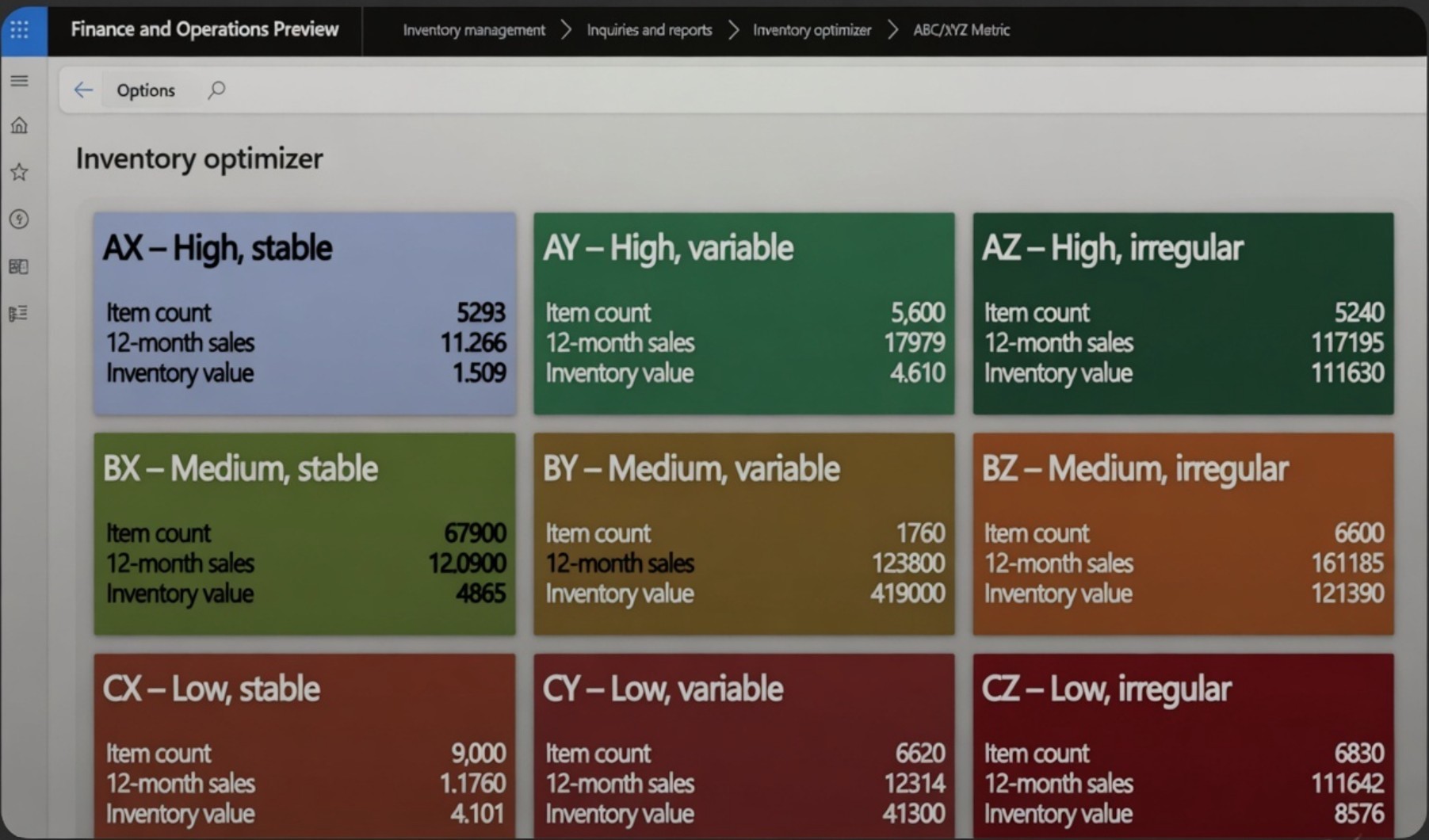
No integrations. No plugins. ForgeStock lives inside Dynamics 365 to eliminate overstock, prevent stockouts, and optimize your supply chain from day one.
Watch video
How ForgeStock works
Step 1
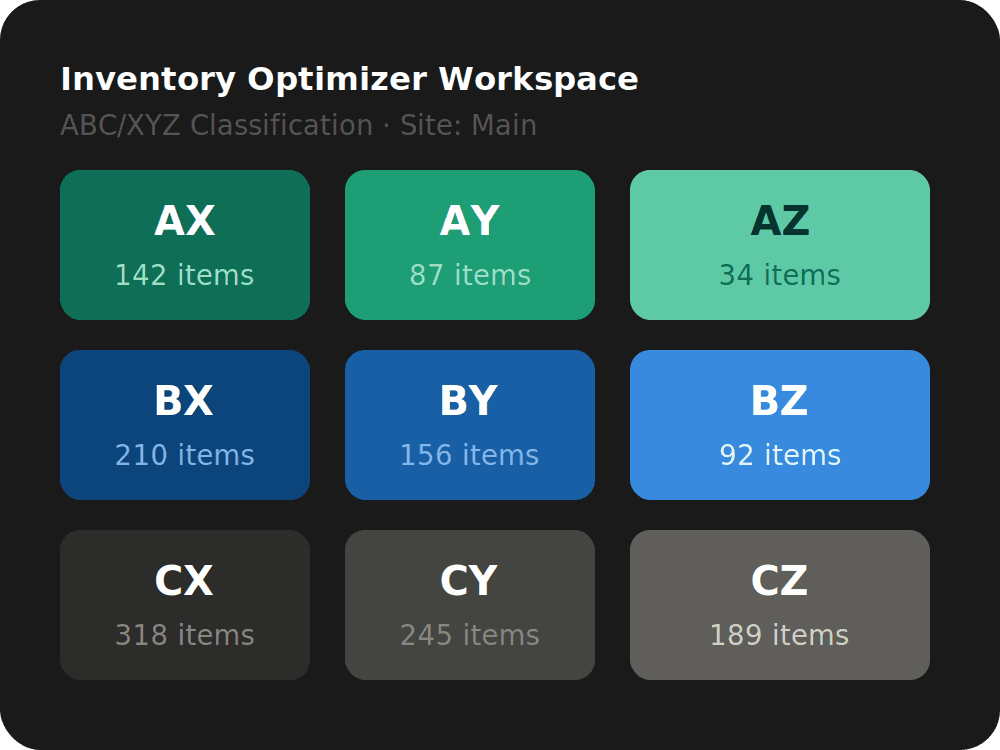
Run the classification
Execute the ABC/XYZ batch job to segment your entire item catalogue by value and demand variability. This is the foundation everything else builds on.
Step 2
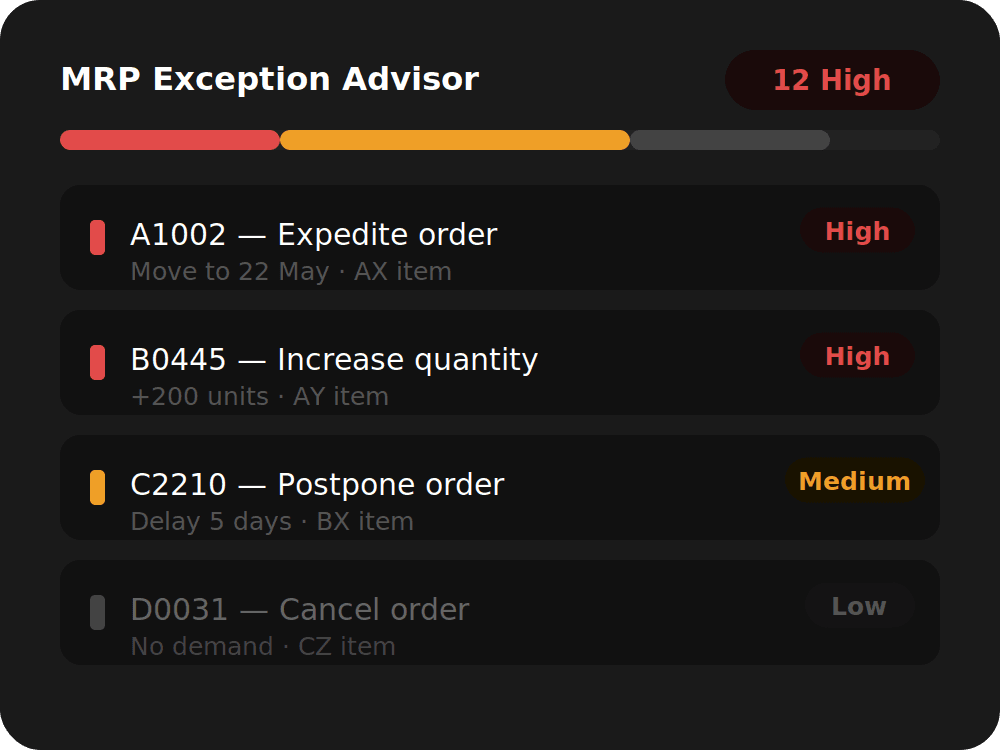
Review your exceptions
Open the MRP, PO, and Stock Level advisors to see what needs attention — prioritised by severity so your team acts on what matters most.
Step 3
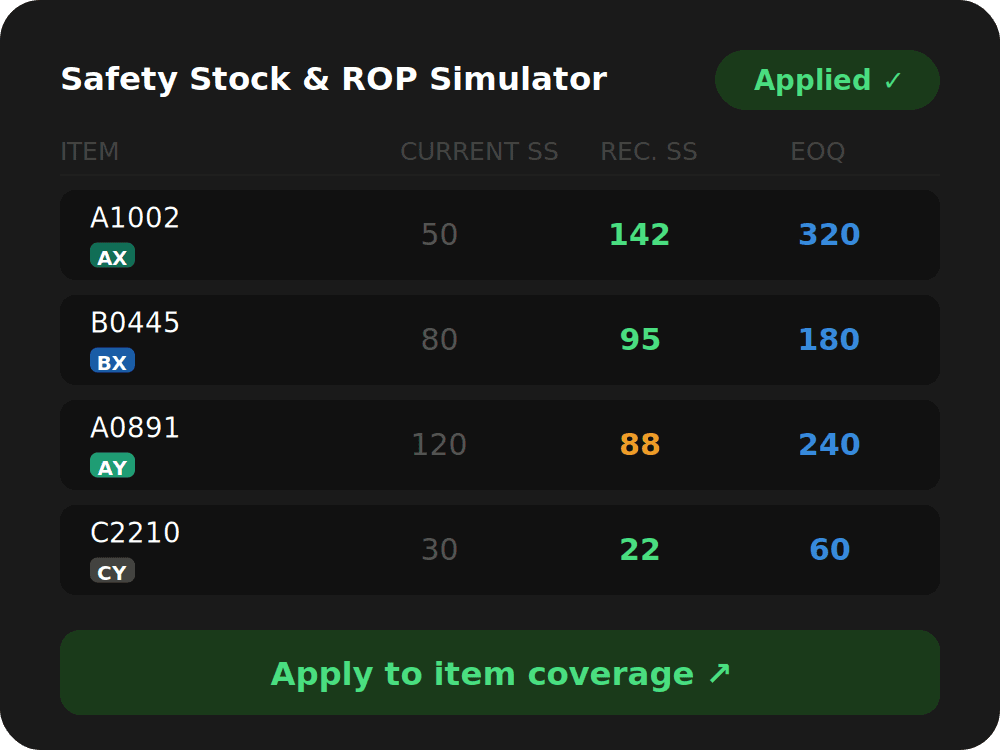
Optimise & apply
Use the Safety Stock, ROP, and EOQ simulators to calculate optimal parameters, then apply them directly to item coverage inside D365FO.
Watch video
How ForgeStock works
Step 1
Run the classification
Execute the ABC/XYZ batch job to segment your entire item catalogue by value and demand variability. This is the foundation everything else builds on.
Step 2
Review your exceptions
Open the MRP, PO, and Stock Level advisors to see what needs attention — prioritised by severity so your team acts on what matters most.
Step 3
Optimise & apply
Use the Safety Stock, ROP, and EOQ simulators to calculate optimal parameters, then apply them directly to item coverage inside D365FO.
Watch video
How ForgeStock works
Step 1
Run the classification
Execute the ABC/XYZ batch job to segment your entire item catalogue by value and demand variability. This is the foundation everything else builds on.
Step 2
Review your exceptions
Open the MRP, PO, and Stock Level advisors to see what needs attention — prioritised by severity so your team acts on what matters most.
Step 3
Optimise & apply
Use the Safety Stock, ROP, and EOQ simulators to calculate optimal parameters, then apply them directly to item coverage inside D365FO.
Every inventory insight, in one place.
Every inventory insight, in one place.
ForgeStock surfaces stock health, planning exceptions, and demand signals in simple views — right inside D365FO.
ForgeStock surfaces stock health, planning exceptions, and demand signals in simple views — right inside D365FO.
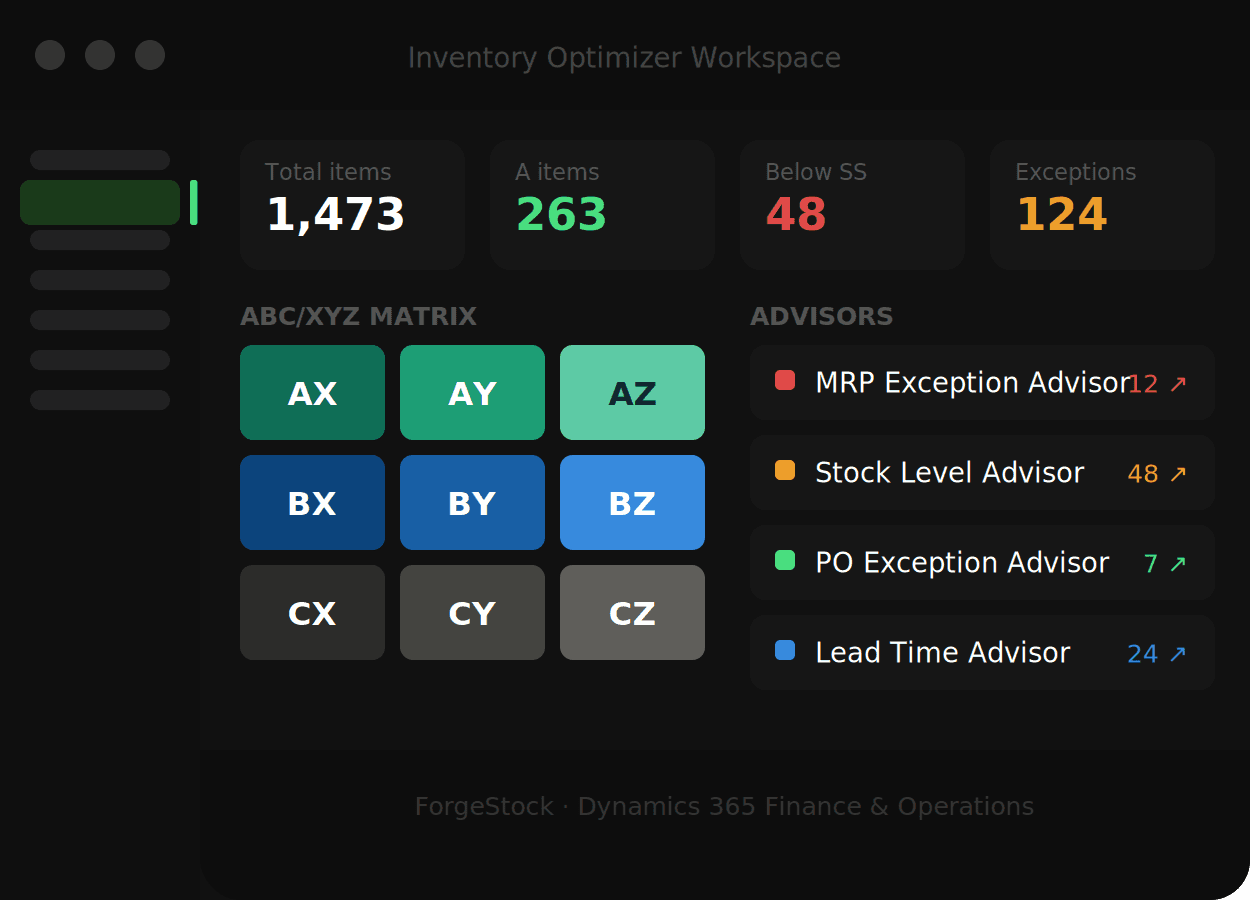
Inventory Optimizer workspace
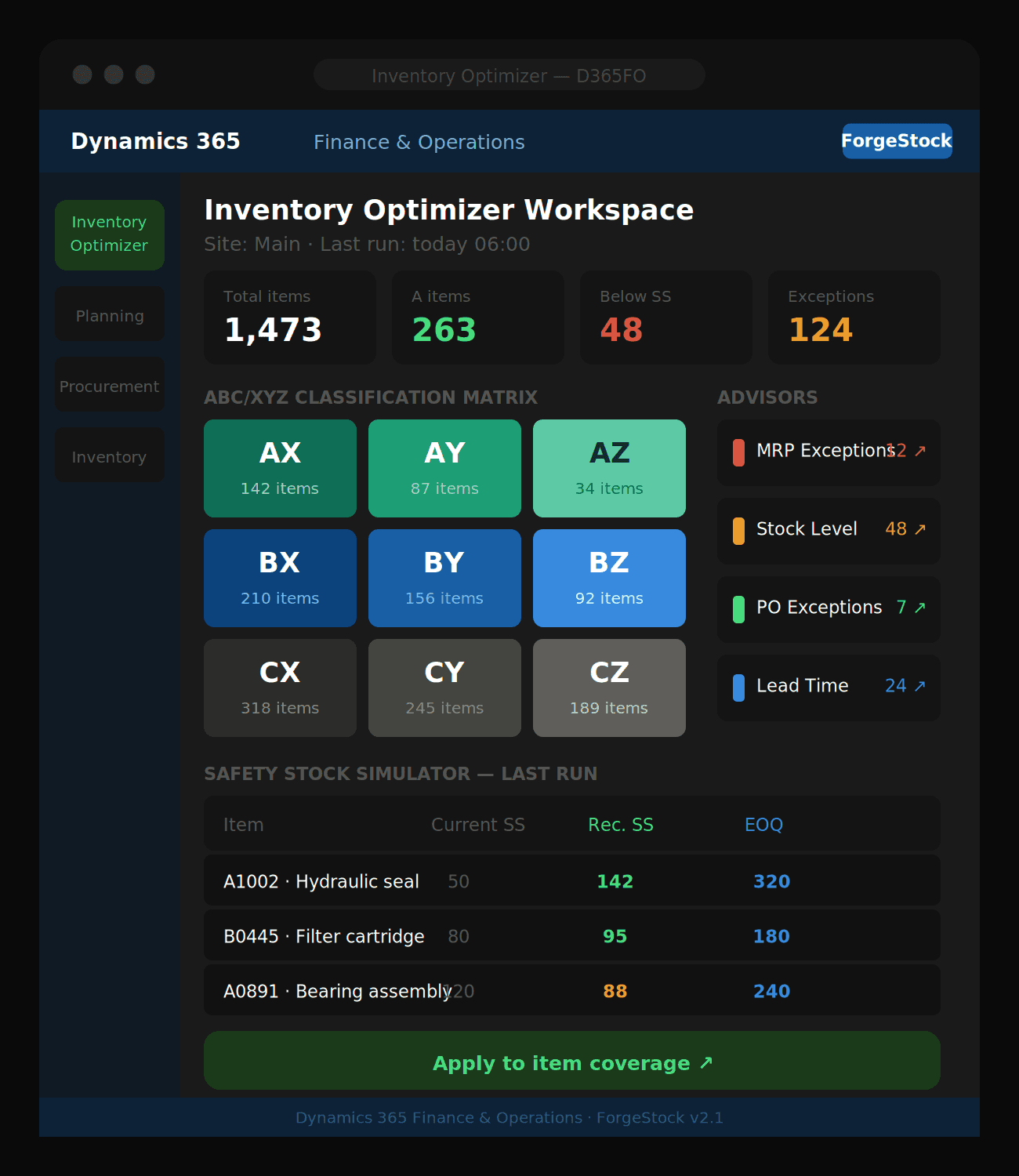
Your central hub — ABC/XYZ tile matrix, summary cards, and quick links to every advisor in one dashboard.
Inventory Optimizer workspace
Your central hub — ABC/XYZ tile matrix, summary cards, and quick links to every advisor in one dashboard.
Inventory Optimizer workspace
Your central hub — ABC/XYZ tile matrix, summary cards, and quick links to every advisor in one dashboard.
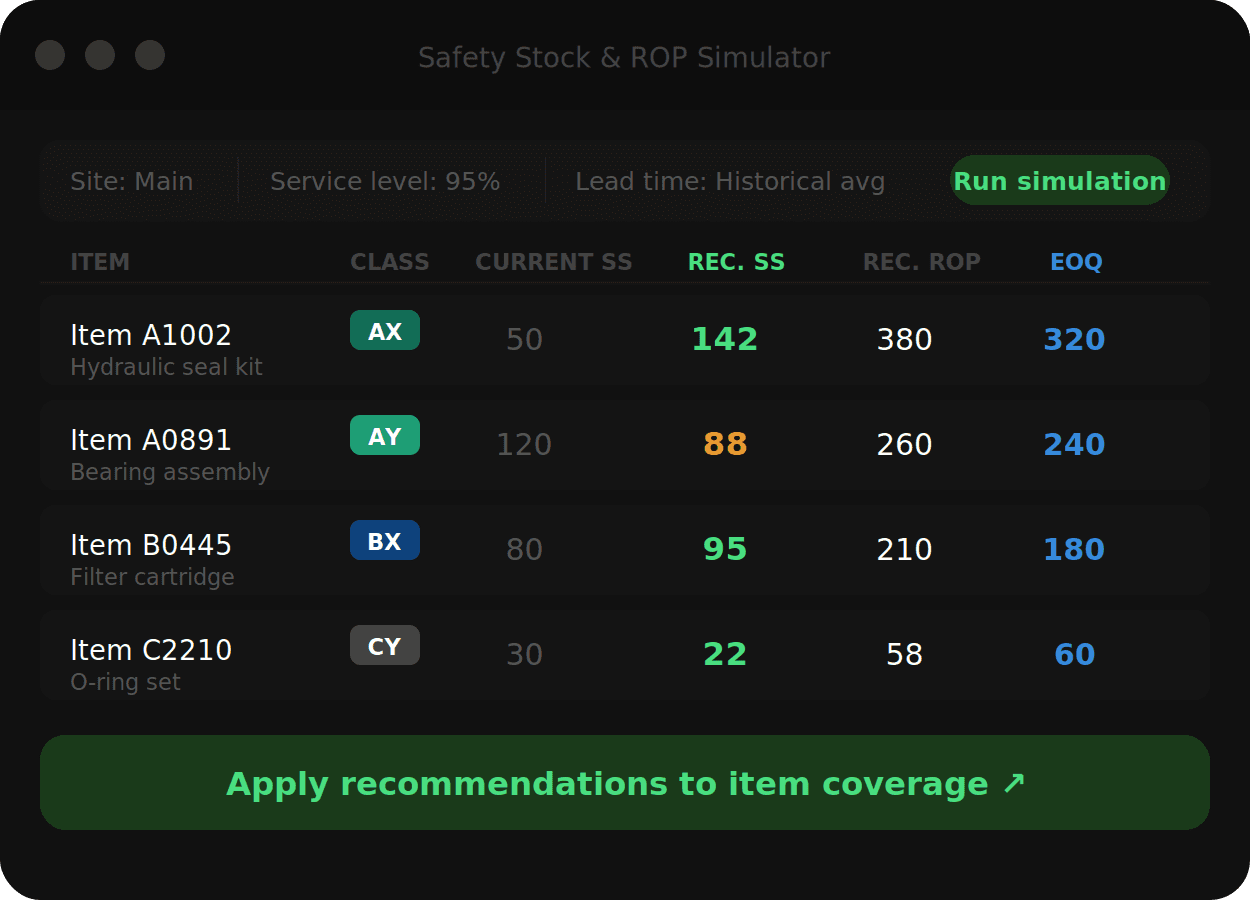
Simulator results
Safety stock, reorder points, and EOQ recommendations calculated per item and ready to apply to coverage.
Simulator results
Safety stock, reorder points, and EOQ recommendations calculated per item and ready to apply to coverage.
Simulator results
Safety stock, reorder points, and EOQ recommendations calculated per item and ready to apply to coverage.
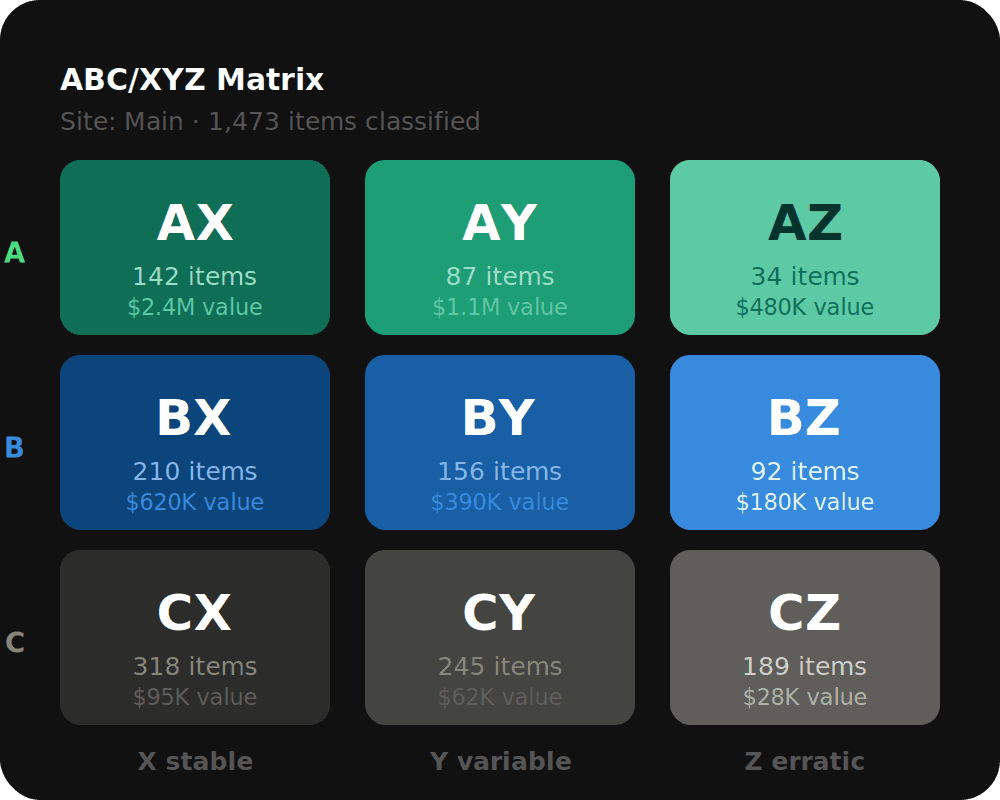
ABC/XYZ matrix
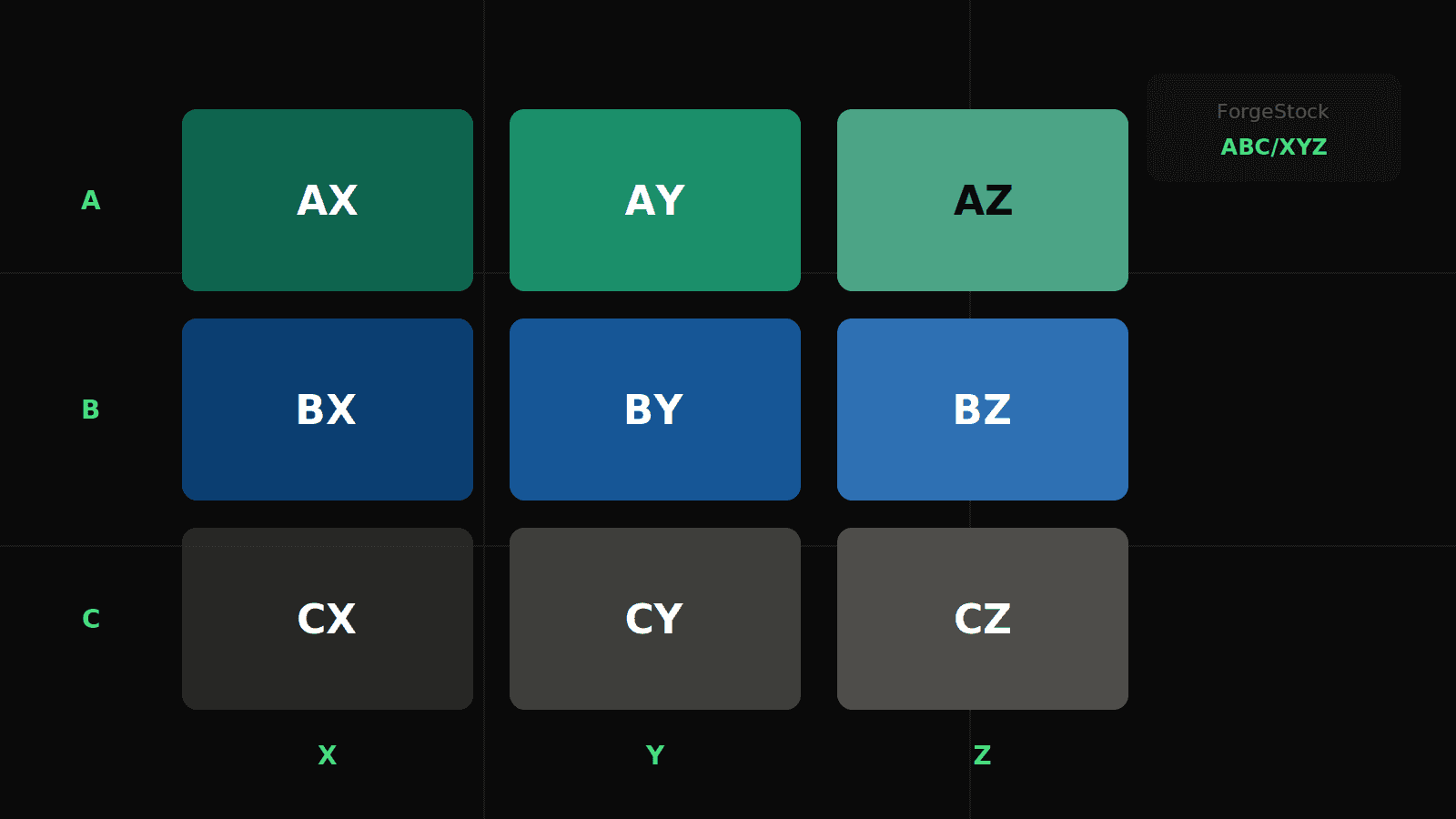
See every item classified across 9 segments — from your high-value stable movers (AX) to slow unpredictable tail (CZ).
ABC/XYZ matrix
See every item classified across 9 segments — from your high-value stable movers (AX) to slow unpredictable tail (CZ).
ABC/XYZ matrix
See every item classified across 9 segments — from your high-value stable movers (AX) to slow unpredictable tail (CZ).
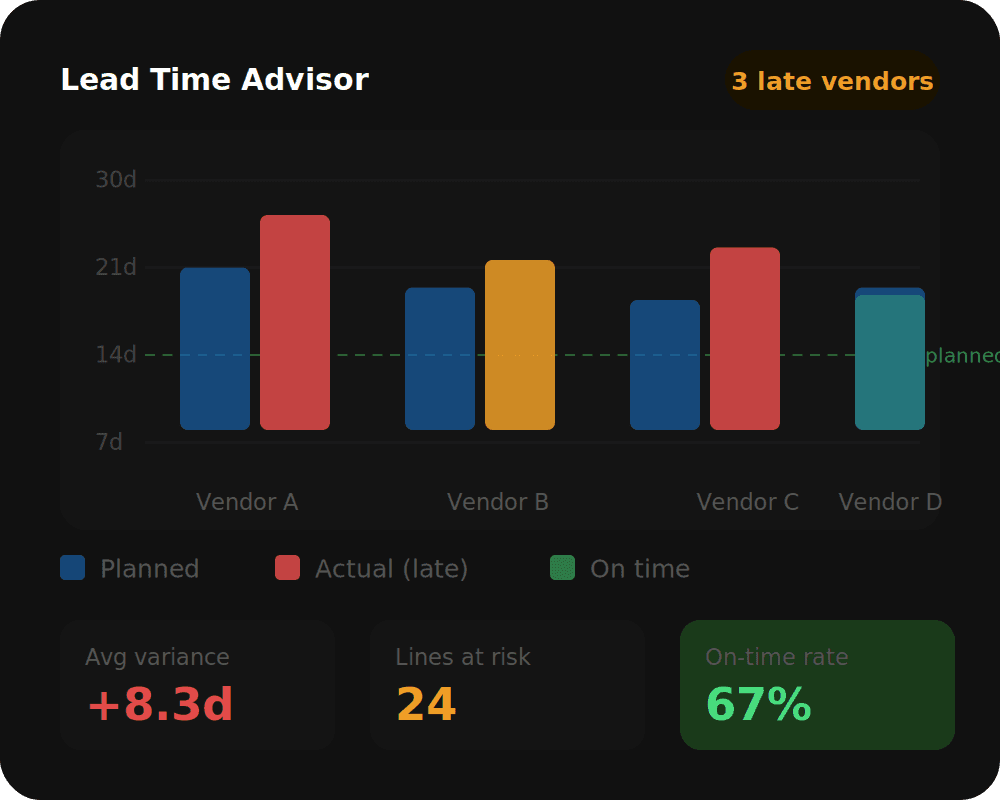
Lead time advisor
Compare planned vs. actual supplier lead times and spot vendors consistently delivering late — before it hits your stock.
Lead time advisor
Compare planned vs. actual supplier lead times and spot vendors consistently delivering late — before it hits your stock.
Lead time advisor
Compare planned vs. actual supplier lead times and spot vendors consistently delivering late — before it hits your stock.
Features
Designed for planners, built inside Dynamics 365.
ABC/XYZ Classification
Segment your entire catalogue by value and demand variability. Every other module builds on this — know where to focus before you act.
MRP exception advisor
Surface, prioritise, and resolve MRP messages in one view. No more drowning in thousands of unactioned planned orders.
Stock Level Advisor
Instantly identify items below safety stock, in excess, or nearing expiry — across every site and warehouse in your organisation.
Safety Stock & ROP Simulator
Calculate statistically optimal safety stock and reorder points using real demand variability and your target service level.
Lot size simulator (EOQ)
Find the economic order quantity that balances ordering cost against holding cost — calculated per item, not guessed per buyer.
Copilot Assistant
Ask questions about your inventory data in plain language. Powered by Azure OpenAI, running natively inside D365FO — no tab switching.
Features
Designed for planners, built inside Dynamics 365.
ABC/XYZ Classification
Segment your entire catalogue by value and demand variability. Every other module builds on this — know where to focus before you act.
MRP exception advisor
Surface, prioritise, and resolve MRP messages in one view. No more drowning in thousands of unactioned planned orders.
Stock Level Advisor
Instantly identify items below safety stock, in excess, or nearing expiry — across every site and warehouse in your organisation.
Safety Stock & ROP Simulator
Calculate statistically optimal safety stock and reorder points using real demand variability and your target service level.
Lot size simulator (EOQ)
Find the economic order quantity that balances ordering cost against holding cost — calculated per item, not guessed per buyer.
Copilot Assistant
Ask questions about your inventory data in plain language. Powered by Azure OpenAI, running natively inside D365FO — no tab switching.
Features
Designed for planners, built inside Dynamics 365.
ABC/XYZ Classification
Segment your entire catalogue by value and demand variability. Every other module builds on this — know where to focus before you act.
MRP exception advisor
Surface, prioritise, and resolve MRP messages in one view. No more drowning in thousands of unactioned planned orders.
Stock Level Advisor
Instantly identify items below safety stock, in excess, or nearing expiry — across every site and warehouse in your organisation.
Safety Stock & ROP Simulator
Calculate statistically optimal safety stock and reorder points using real demand variability and your target service level.
Lot size simulator (EOQ)
Find the economic order quantity that balances ordering cost against holding cost — calculated per item, not guessed per buyer.
Copilot Assistant
Ask questions about your inventory data in plain language. Powered by Azure OpenAI, running natively inside D365FO — no tab switching.
Why ForgeStock?
There's a smarter way to manage inventory
Other Tools
Spreadsheets and manual stock counts
No visibility on MRP exceptions until it's too late
Safety stock set by gut feel or fixed days
Lead times guessed or outdated in item coverage
Generic ERP support, slow response
ABC/XYZ classification, automated and always current
MRP Exception Advisor surfaces issues before they impact production
Statistically optimal safety stock based on real demand variability
Lead Time Advisor compares planned vs. actual supplier performance
Built by D365FO specialists who know X++ inside out
Other Tools
Spreadsheets and manual stock counts
No visibility on MRP exceptions until it's too late
Safety stock set by gut feel or fixed days
Lead times guessed or outdated in item coverage
Generic ERP support, slow response
ABC/XYZ classification, automated and always current
MRP Exception Advisor surfaces issues before they impact production
Statistically optimal safety stock based on real demand variability
Lead Time Advisor compares planned vs. actual supplier performance
Built by D365FO specialists who know X++ inside out
Got questions?
We’ve got answers.
Here’s everything you need to know before getting started.
01
What is ForgeStock built on?
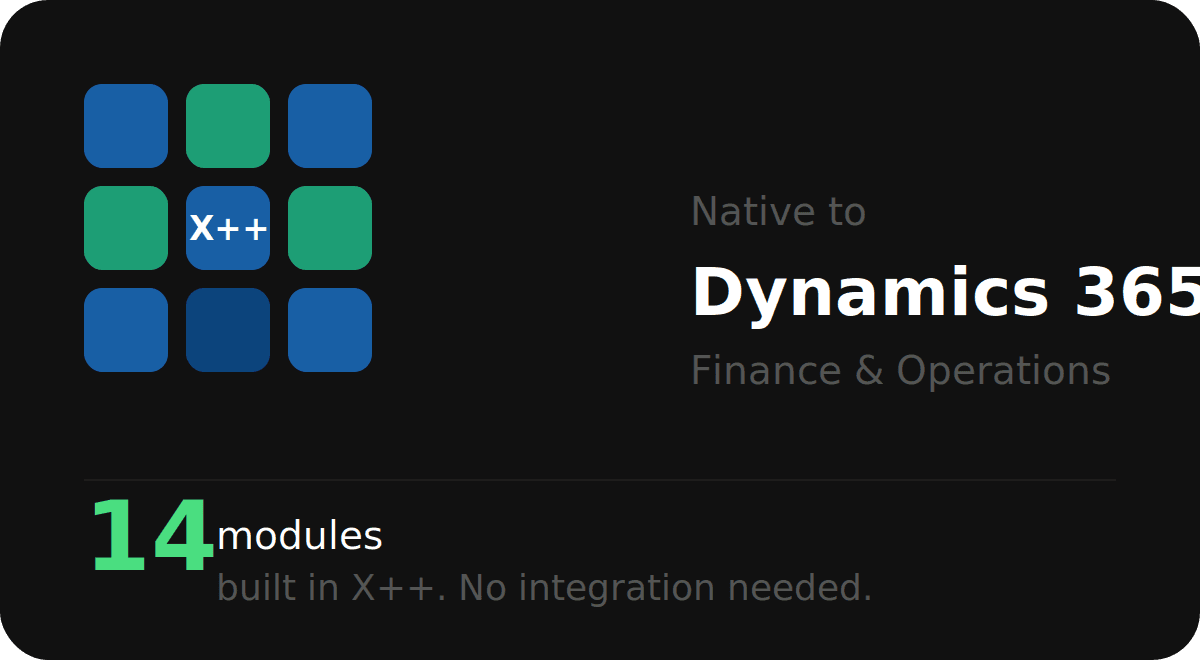
ForgeStock is a native X++ module running inside Dynamics 365 Finance & Operations. No integration, no plugin — it lives where your team already works.
02
Do I need to run batch jobs to use it?
Yes. Most features are powered by scheduled batch jobs (e.g. ABC/XYZ Classification, MRP Exception Advisor). These run on your schedule and keep data fresh automatically.
03
Where do I find ForgeStock in D365FO?
Navigate to Inventory management → Inquiries and reports → Inventory Optimizer, or use the Inventory Optimizer workspace pinned to your dashboard.
04
Does it work with my existing item coverage setup?
Yes. ForgeStock reads your existing coverage groups, item parameters, and planning fences. The Safety Stock and EOQ simulators write recommendations back to item coverage when you apply them.
05
What do I need before running the simulators?
Run the ABC/XYZ Classification batch job first. The Safety Stock, ROP, and Lot Size simulators all depend on demand statistics generated by that job..
06
Can the Copilot Assistant answer questions about my inventory?
Yes. The built-in Copilot Assistant is powered by Azure OpenAI and can answer natural language questions about your stock levels, MRP exceptions, supplier lead times, and ABC/XYZ classifications — without leaving D365FO.
Got questions?
We’ve got answers.
Here’s everything you need to know before getting started.
01
What is ForgeStock built on?
ForgeStock is a native X++ module running inside Dynamics 365 Finance & Operations. No integration, no plugin — it lives where your team already works.
02
Do I need to run batch jobs to use it?
Yes. Most features are powered by scheduled batch jobs (e.g. ABC/XYZ Classification, MRP Exception Advisor). These run on your schedule and keep data fresh automatically.
03
Where do I find ForgeStock in D365FO?
Navigate to Inventory management → Inquiries and reports → Inventory Optimizer, or use the Inventory Optimizer workspace pinned to your dashboard.
04
Does it work with my existing item coverage setup?
Yes. ForgeStock reads your existing coverage groups, item parameters, and planning fences. The Safety Stock and EOQ simulators write recommendations back to item coverage when you apply them.
05
What do I need before running the simulators?
Run the ABC/XYZ Classification batch job first. The Safety Stock, ROP, and Lot Size simulators all depend on demand statistics generated by that job..
06
Can the Copilot Assistant answer questions about my inventory?
Yes. The built-in Copilot Assistant is powered by Azure OpenAI and can answer natural language questions about your stock levels, MRP exceptions, supplier lead times, and ABC/XYZ classifications — without leaving D365FO.
Got questions?
We’ve got answers.
Here’s everything you need to know before getting started.
01
What is ForgeStock built on?
ForgeStock is a native X++ module running inside Dynamics 365 Finance & Operations. No integration, no plugin — it lives where your team already works.
02
Do I need to run batch jobs to use it?
Yes. Most features are powered by scheduled batch jobs (e.g. ABC/XYZ Classification, MRP Exception Advisor). These run on your schedule and keep data fresh automatically.
03
Where do I find ForgeStock in D365FO?
Navigate to Inventory management → Inquiries and reports → Inventory Optimizer, or use the Inventory Optimizer workspace pinned to your dashboard.
04
Does it work with my existing item coverage setup?
Yes. ForgeStock reads your existing coverage groups, item parameters, and planning fences. The Safety Stock and EOQ simulators write recommendations back to item coverage when you apply them.
05
What do I need before running the simulators?
Run the ABC/XYZ Classification batch job first. The Safety Stock, ROP, and Lot Size simulators all depend on demand statistics generated by that job..
06
Can the Copilot Assistant answer questions about my inventory?
Yes. The built-in Copilot Assistant is powered by Azure OpenAI and can answer natural language questions about your stock levels, MRP exceptions, supplier lead times, and ABC/XYZ classifications — without leaving D365FO.
Explore the blog
Category
How to run ABC/XYZ Classification in ForgeStock
A step-by-step guide to segmenting your item catalogue by value and demand variability — and why it matters for your planning team.
Explore the blog
Category
How to run ABC/XYZ Classification in ForgeStock
A step-by-step guide to segmenting your item catalogue by value and demand variability — and why it matters for your planning team.
Explore the blog
Category
How to run ABC/XYZ Classification in ForgeStock
A step-by-step guide to segmenting your item catalogue by value and demand variability — and why it matters for your planning team.
Ready to optimize your inventory?
See how ForgeStock eliminates overstock, prevents stockouts, and brings intelligence to your D365FO — it only takes a conversation to get started.
Ready to optimize your inventory?
See how ForgeStock eliminates overstock, prevents stockouts, and brings intelligence to your D365FO — it only takes a conversation to get started.
Ready to optimize your inventory?
See how ForgeStock eliminates overstock, prevents stockouts, and brings intelligence to your D365FO — it only takes a conversation to get started.